Online YMAP editor & MLO planner
Map Studio is a free, local browser tool for arranging GTA V prop placements and planning simple Legacy interiors. Work with editable source, then use the desktop toolchain to compile and test.
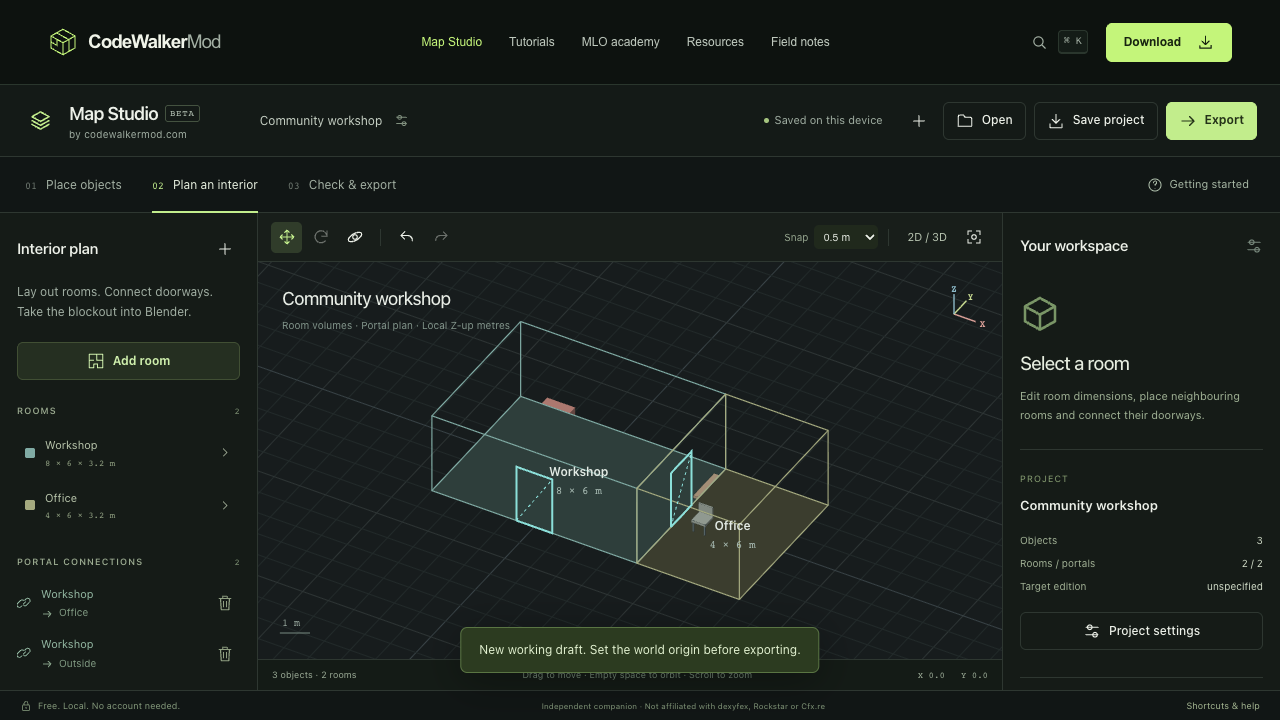
Plan here. Compile and test in the right tools.
Place, move and rotate illustrative props, organize a layout, or block out connected rectangular rooms. Browser previews are not GTA game geometry. Save your project file before closing; local browser storage is not a backup.
A simple prop layout can export CodeWalker YMAP XML. An MLO package needs the CW Studio Blender companion and Sollumz to produce asset XML, followed by native compilation in CodeWalker and acceptance on a development FiveM server. This is not a browser MLO compiler.
Opening Map Studio…
Your first editable layout
- Download the three-prop source project and open the JSON file using the editor’s Open control. The three placements use illustrative bounds.
- Select a prop, adjust its position, then save a separate JSON copy. Your model names must resolve in your own game installation.
- Export the source package. Open the YMAP XML through the compatible CodeWalker XML workflow, recalculate extents and flags against the real assets, and save native output.
- Use the manifest generator, then follow the first-YMAP walkthrough and record an in-game check. A successful browser export is not that check.
Supported inputs and outputs
| Format | Role here | Limit |
|---|---|---|
| Map Studio JSON | Editable project: placements, rooms and portals | Use the supported project schema; keep an original backup |
CodeWalker .ymap.xml | Import/export ordinary prop placements | Not a lossless editor for every YMAP section; parent-linked maps are rejected |
| Legacy native YMAP (experimental) | Use Native YMAP in the editor for source-preserving edits and direct binary export | Independent orphan-HD placements only; new maps require verified bounds. No in-game certification. |
CodeWalker .ytyp.xml | Import supported archetype metadata | Does not load native game meshes or texture dictionaries |
| Package-v2 ZIP / OBJ | Source handoff and room blockout | Not a ready-to-stream resource; use the companion for MLO XML |
| Native YDR, YBN, RPF; Menyoo XML | Not directly supported by this browser importer | Use the appropriate desktop conversion workflow |
Continue an MLO in Blender
The companion’s documented source toolchain is Blender 4.2.23 LTS, Sollumz 2.9.0 and szio 1.3.0.dev9. Choose the Legacy target. Install and enable Sollumz before CW Studio, then use Import → Validate → Export in its sidebar.
Download CW Studio 0.1.0 · SHA-256 checksum · Original MLO source example. The add-on is GPL-3.0-or-later. Review its included README and license before installation.
The companion’s source pipeline is documented separately from native and in-game acceptance. It does not run CodeWalker or FiveM. Read the setup guide and MLO walkthrough before treating any output as deliverable.
Current scope and limitations
The source MLO workflow is Legacy/Gen8, one level, axis-aligned rectangular rooms with simple rectangular doorways, up to 31 rooms plus limbo. It does not cut existing buildings, author stairs, animated assets or dynamic doors, bake lighting, or convert Enhanced assets. It cannot replace Blender modeling or in-game testing.
Import only files you are entitled to use. The editor processes project data locally; it does not upload your map to an editing service. This website’s separate analytics and hosting requests are described in Privacy.
Choose your next step
Using a Mac? Keep browser planning and Blender work separate from the Windows compilation step. For an existing map that will not load, use the troubleshooting guide. For model names, use object identification.